
AMD now has a Vivado-focused assistant at vivado.amd.com/chat, currently in beta. Depending on account access, the useful experience is the Vivado chatbot interface: a place to ask tool-flow questions, find relevant documentation paths, and turn vague Vivado problems into a concrete checklist.[1]
This kind of tool can be genuinely useful. Vivado has a huge surface area: synthesis, constraints, implementation, timing closure, IP integrator, debug, Tcl, licensing, reports, messages, device support, and version-specific behavior. A chat interface can help you get from "I have a warning" to "I know which report and command to check" much faster.
But there is a trap: a chatbot answer is not a timing sign-off, a license interpretation, or a replacement for testing the design in your local Vivado version. Treat it as a fast navigation layer over documentation and tool behavior, not as the final authority.
This guide assumes some working familiarity with Vivado timing and constraints; where a term is niche, it is glossed in parentheses on first use.
The Short Version
Use the Vivado chatbot for four things:
Ask it to translate warnings, timing terms, report sections, and Tcl command families into plain engineering language.
Ask which AMD guide, command, report, or workflow section is relevant before you start reading.
Use it to turn a vague failure into a sequence of checks, then verify every step in Vivado.
Ask it for commands that match your intent, then verify syntax and side effects before running them.
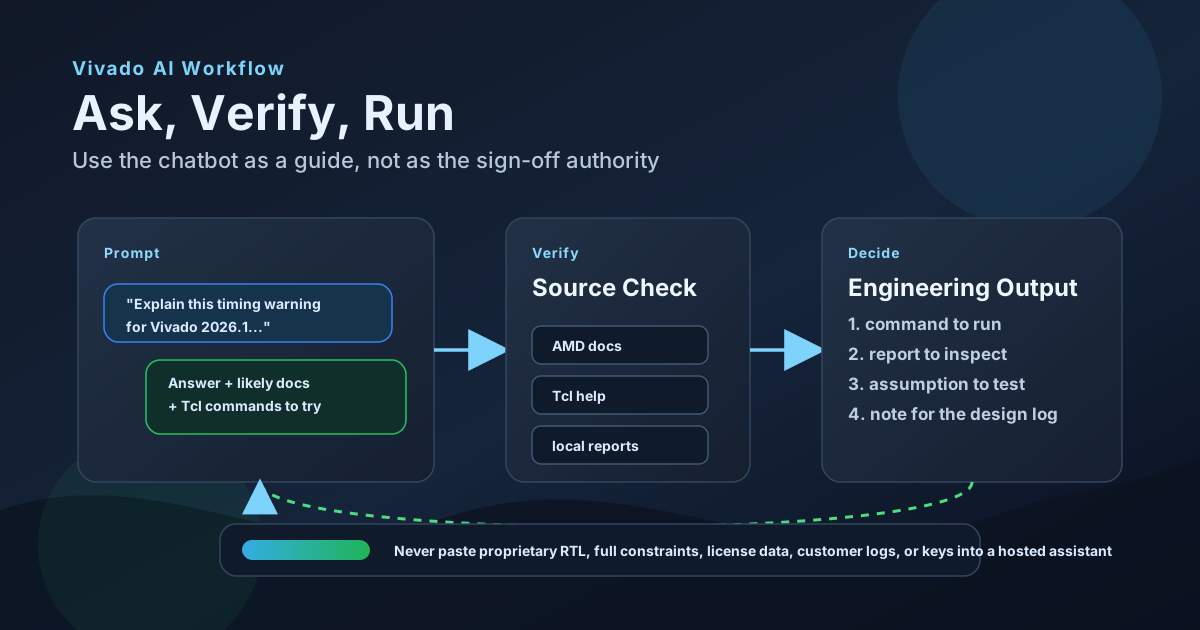
Do not use it as the only source for constraints, clock-domain crossing (CDC) decisions, licensing, security features, device support, or production sign-off.
Two Ways to Use the Doc Search
There are two practical entry points into AMD's Vivado documentation search:
| Interface | Best for | Watch out for |
|---|---|---|
Vivado chatbot at vivado.amd.com/chat |
Interactive Q&A: explaining messages, finding docs, drafting debug steps, and asking follow-up questions in a browser. | You still need to verify the answer against AMD docs, local help, and Vivado reports. |
MCP doc-search endpoint at vivado.amd.com/mcp/doc-search |
Agent workflows: letting an MCP-capable assistant look up Vivado documentation while it helps write scripts, commands, checklists, or review notes. | Be careful about what project context the agent is allowed to send. Keep proprietary RTL, constraints, logs, and identifiers out of tool calls. |
The difference is mostly workflow. The web chatbot is a conversation you drive manually. The MCP endpoint is a tool an assistant can call inside a larger engineering workflow. In both cases, the output is guidance for what to check next, not an authority that signs off timing, CDC, security, or licensing.
Ask Like You Would File a Good Bug Report
The quality of the answer depends heavily on the prompt. "Why does timing fail?" is too broad. Give it the same context you would give a senior FPGA engineer.
Useful context:
- Vivado version, for example 2026.1
- device family and part number, if safe to share
- project mode or non-project mode
- synthesis or implementation stage
- exact message ID or report section
- timing path type: setup, hold, CDC, generated clock, I/O delay, or unconstrained path
- what you already checked
- what kind of answer you want: concept, Tcl commands, report checklist, or docs to read
Bad prompt:
Why does implementation fail?
Better prompt:
I am using Vivado 2026.1 on an UltraScale+ design.
Implementation completes but route_design reports negative setup slack.
The worst paths are between two generated clocks from the same MMCM.
Give me a debug checklist, the Vivado reports to run, and the AMD docs I should verify.
That prompt does not expose RTL, customer names, or private constraints, but it gives enough structure for the assistant to be useful.
The Verification Loop
For Vivado work, a good chatbot answer should lead to a verification loop:
| Chatbot output | How to verify it |
|---|---|
| A Tcl command | Check UG835 and run help command_name in your installed Vivado version.[2] |
| A synthesis suggestion | Check UG901, then compare synthesis logs and utilization before/after the change.[3] |
| An implementation strategy idea | Check UG904, run controlled implementation experiments, and keep the run settings in version control.[4] |
| An XDC constraint (Xilinx Design Constraints) | Check UG903, then inspect report_timing_summary, check_timing, report_methodology, and constraint coverage.[5], [6] |
| A timing-closure diagnosis | Check UG906 and confirm with local reports, not just the natural-language explanation.[6] |
The chatbot should shorten the path to the right report. It should not replace the report.
Prompts That Work Well
Here are practical prompts worth keeping.
For Vivado messages
Explain this Vivado warning in practical terms.
Tell me whether it is usually harmless, risky, or sign-off blocking.
Then list the reports or Tcl commands I should run to confirm.

Message:
[paste message ID and short text only]
For Tcl command discovery
I need to find all paths crossing from clock A to clock B in Vivado 2026.1.
Give me candidate Tcl commands, but also tell me which ones I should verify in UG835 or with Vivado help.
For constraints review
Review this XDC idea conceptually.
Do not assume it is correct.
Tell me what could go wrong with clock groups, generated clocks, and false paths,
and which Vivado reports, including report_methodology, should prove the constraint is safe.
For timing closure
I have negative setup slack after route_design.
Make a triage checklist ordered by fastest checks first:
constraints, clocking, fanout, placement, routing, and implementation strategy.
For each step, name a Vivado report to inspect.
For version-specific questions
Answer for Vivado 2026.1 only.
If behavior changed in older releases, say that the answer is version-sensitive.
Point me to the AMD documentation area I should verify.
That last phrase matters. Vivado answers are often version-sensitive. Do not treat the assistant's version label as proof by itself: check the AMD documentation page version, release selector, and your installed Vivado help output, because documentation search can still surface adjacent-release pages when they are the best match.
What Not to Paste
Hosted assistants are convenient, but FPGA projects often contain sensitive information. Do not paste:
- proprietary RTL blocks
- full XDC files from customer projects
- bitstream encryption or security settings
- license server names, paths, or keys
- customer names, board names, serial numbers, or production logs
- full timing reports that reveal hierarchy or product architecture
- unreleased device choices, roadmaps, or commercial terms
Instead, reduce the problem to a sanitized shape:
The path starts in clock domain A and ends in clock domain B.
The clocks are generated from the same MMCM.
The setup slack is negative after route_design.
What reports should I check before changing constraints?
That is enough to get useful guidance without disclosing the design.
Where It Can Mislead You
The chatbot is most dangerous when the answer sounds confident and the question is subtle.
Be especially careful with:
set_false_path,set_clock_groups, and multicycle constraints- generated clocks and clock propagation
- asynchronous reset handling
- CDC sign-off
- DONT_TOUCH, MARK_DEBUG, and debug-related optimization side effects
- encrypted bitstreams and security features
- license-tier availability
- device/package/speed-grade support
- IP customization parameters
The reason is simple: small wording differences in Vivado constraints can change the timing graph. AMD's constraints guide covers XDC methodology, ordering, generated clocks, clock groups, timing exceptions, and object queries in detail because these are not casual settings.[5]
If the chatbot gives you a constraint, treat it as a hypothesis. Then ask Vivado what changed.
Concrete Misleading Answers to Watch For
Here are the kinds of confident answers that look helpful but can damage a Vivado debug session.
Misleading answer: "The two clocks cross domains, so add set_clock_groups -asynchronous between them."
That might be right for truly asynchronous clocks with safe synchronizers, but it is unsafe as a reflex. set_clock_groups disables timing in both directions and has higher priority than ordinary timing exceptions. If you still need to constrain or report selected paths between those clocks, clock groups can hide the very paths you meant to inspect. Before accepting that answer, check report_clock_interaction, report_cdc, report_methodology, and the CDC structure itself.[5], [7]
Misleading answer: "A negative slack path between unrelated clocks is just a false path."
Maybe. But a timing exception is not a CDC design. AMD's CDC guidance separates the timing exception from the structural question: does the path use proper synchronization, does it need set_max_delay -datapath_only, does a multi-bit transfer need bus skew checking, and how does report_cdc classify the structure - safe, unsafe, or unknown, and at what severity (Info, Warning, or Critical)? A false path can make timing look clean while leaving a real hardware failure mode in place.[5], [6]
Misleading answer: "Add MARK_DEBUG or DONT_TOUCH to keep the signal visible; it is harmless."
It is not always harmless. Vivado preserves MARK_DEBUG nets for probing, and this can restrict optimization much like DONT_TOUCH - a marked net carries an implicit DONT_TOUCH. AMD notes that debug preservation can increase area, slow the design, affect related hierarchy, and make timing closure harder. Use it deliberately: set MARK_DEBUG only on the nets you actually need to probe - set_property MARK_DEBUG true [get_nets <net>], or the (* mark_debug = "true" *) HDL attribute - rather than blanket-marking timing-critical logic.[6], [8]
A Practical Workflow
For day-to-day engineering, I would use this loop:
- Ask the chatbot for a short explanation and a checklist.
- Ask it to name the relevant AMD document or Vivado report.
- Verify the Tcl command in UG835 or local
help. - Run the report locally.
- Save the report snippet or command output in your issue/design log.
- Only then change RTL, constraints, IP parameters, or implementation strategy.
That may sound slower than just accepting the answer. In practice it is faster, because it avoids the worst failure mode: applying an AI-generated fix that hides the real problem.
When MCP Is Better
If you already work inside an MCP-capable assistant - Claude, Codex, or another Model Context Protocol client - you do not have to open a browser to use the doc search. AMD exposes the documentation search as an MCP server at https://vivado.amd.com/mcp/doc-search.[10]
Model Context Protocol (MCP) is an open standard for connecting AI assistants to external tools and data. Point your client at that endpoint and the assistant gains a Vivado doc-search tool it can call directly: you ask a Vivado question in your normal workflow, and the assistant queries AMD's documentation through the tool instead of answering from training data alone.
Why it is worth wiring up:
- It stays in your workflow. Look up a message ID or a Tcl command while you are writing constraints or a script, without switching tabs.
- It grounds answers in AMD docs. The tool returns documentation search results, so the assistant is pulling from AMD's own material rather than improvising.
- It composes. The doc search can sit next to your other MCP tools, so an agent can look up a Vivado detail as one step in a larger task.
Setup is the usual MCP flow: add the server URL to your client's MCP configuration the way you would add any HTTP MCP server, authenticate with your AMD account, and the doc-search tool appears to the assistant. Because it is beta and account-gated, expect the exact configuration and auth to change - follow the endpoint's own instructions.
Two cautions carry over, and one gets sharper:
- It is still documentation search, not sign-off. Everything in the verification loop applies: confirm against your installed Vivado version and local reports.
- The data-hygiene rules matter more here. In the web chat you choose what to paste; with an agent driving MCP calls, it is easy to let the assistant send file contents or context automatically. Keep proprietary RTL, constraints, and identifiers out of what the agent is allowed to share - see "What Not to Paste" above.
Example: A Synthesis Warning (Start Here)
Start with something low-stakes. Suppose synthesis prints a warning you do not recognize - say, an inferred latch or a multi-driven net. A safe first loop:
- Paste only the message ID and short text (not your RTL) and ask what it means and whether it is usually harmless, risky, or sign-off blocking.
- Ask which Vivado report or message log confirms it.
- Open that log in Vivado and find the exact source line.
- Decide from the evidence in front of you, not the explanation alone.
The assistant orients you; Vivado confirms. That same pattern scales to the harder problem below.
Example: Timing Closure
This one is higher-stakes. (Setup slack is a timing path's margin against the clock; negative slack means the logic is too slow to meet timing.) Suppose the chatbot says:
Try a different implementation strategy and add a false path between unrelated clocks.
That is not good enough.
A better engineering response is:
- Are the clocks truly unrelated?
- Does
report_clock_interactionagree? - Does
check_timingshow unconstrained or suspicious paths? - Is the violation a real data path, a CDC path, a generated-clock modeling issue, or an I/O constraint issue?
- Does the implementation strategy change fix the root cause or only move the failure?
UG906 is the better anchor for timing analysis and closure techniques, because it focuses on timing reports, clock trees, constraints, floorplanning, and runtime/QoR tradeoffs.[6]
The chatbot can help you ask those questions. Vivado must answer them.
The Bottom Line
The Vivado chatbot is useful if you treat it as a fast assistant for navigation, explanation, and first-pass triage. It is not a replacement for AMD documentation, local Tcl help, timing reports, or engineering judgment.
The strongest way to use it is:
- ask specific questions
- request report names and doc pointers
- keep private project details out of the prompt
- run the suggested commands locally
- write down what changed
That turns the chatbot from a risky oracle into something much more useful: a fast front end to the Vivado knowledge you still have to verify.
References
- AMD Vivado chatbot - Vivado-focused web assistant.
- AMD UG835: Vivado Design Suite Tcl Command Reference Guide, 2026.1.
- AMD UG901: Vivado Design Suite User Guide: Synthesis, 2026.1.
- AMD UG904: Vivado Design Suite User Guide: Implementation, 2026.1.
- AMD UG903: Vivado Design Suite User Guide: Using Constraints, 2026.1.
- AMD UG906: Vivado Design Suite User Guide: Design Analysis and Closure Techniques, 2026.1.
- AMD UG949: UltraFast Design Methodology Guide for FPGAs and SoCs, "Report CDC."
- AMD UG912: Vivado Design Suite Properties Reference Guide, "MARK_DEBUG."
- AMD UG973: Vivado Design Suite Release Notes, Installation, and Licensing, "Feature Availability by Subscription Tier."
- AMD Vivado documentation-search MCP server, vivado.amd.com/mcp/doc-search - Model Context Protocol endpoint for the Vivado doc search (beta; AMD account required).
Related Articles
Need help turning FPGA tool answers into a real debug or timing-closure plan? We can help separate useful guidance from risky assumptions.
Comments
Loading comments...
Leave a Comment